We’re sorry for the inconvenience. Please follow these steps to locate your redeemed voucher code:
Step 1: Open Your Giftee Box Link
Tap the link you received via email or SNS.
This will open your Giftee Box dashboard directly.
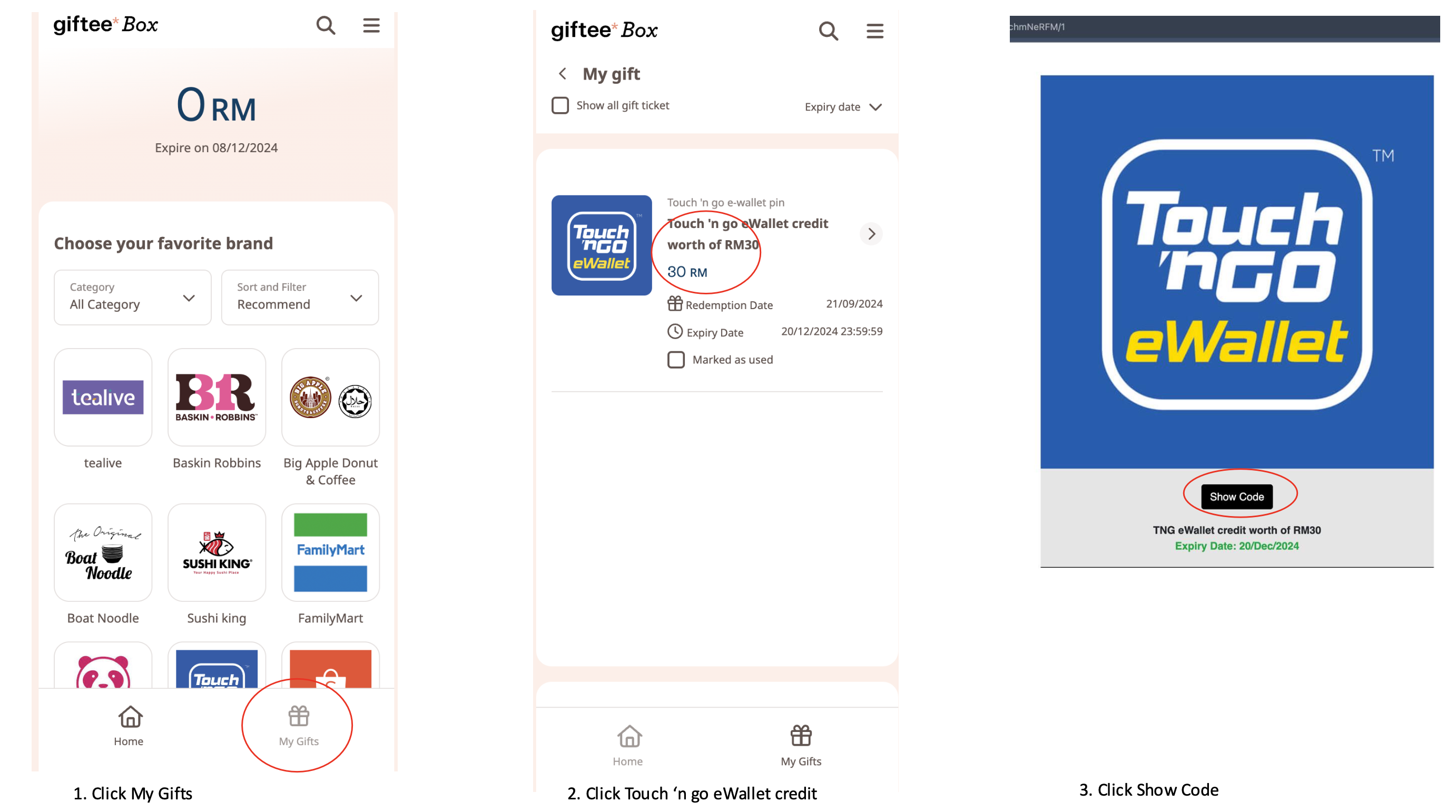
Step 2: Go to “My Gifts”
Tap on the “My Gifts” section (usually at the bottom or in the menu).
Step 3: Select the “Available” Tab
Redeemed vouchers will appear under the “Available” tab.
This tab shows all vouchers you’ve opened or used.
Step 4: Tap the Voucher Again
Look for the brand of the voucher you redeemed.
Tap on it to reopen the voucher details.
Step 5: Tap “Show Code”
Tap the “Show Code” or “View Details” button to reveal your voucher code or barcode again.
Step 6: Still Can’t Access It?
Submit a support ticket so we can investigate further.
Was this article helpful?
That’s Great!
Thank you for your feedback
Sorry! We couldn't be helpful
Thank you for your feedback
Feedback sent
We appreciate your effort and will try to fix the article