ZUS Coffee vouchers can only be redeemed via the ZUS Coffee mobile app and are not valid for offline or walk-in redemption. Once redeemed, the voucher value will be credited to your ZUS balance.
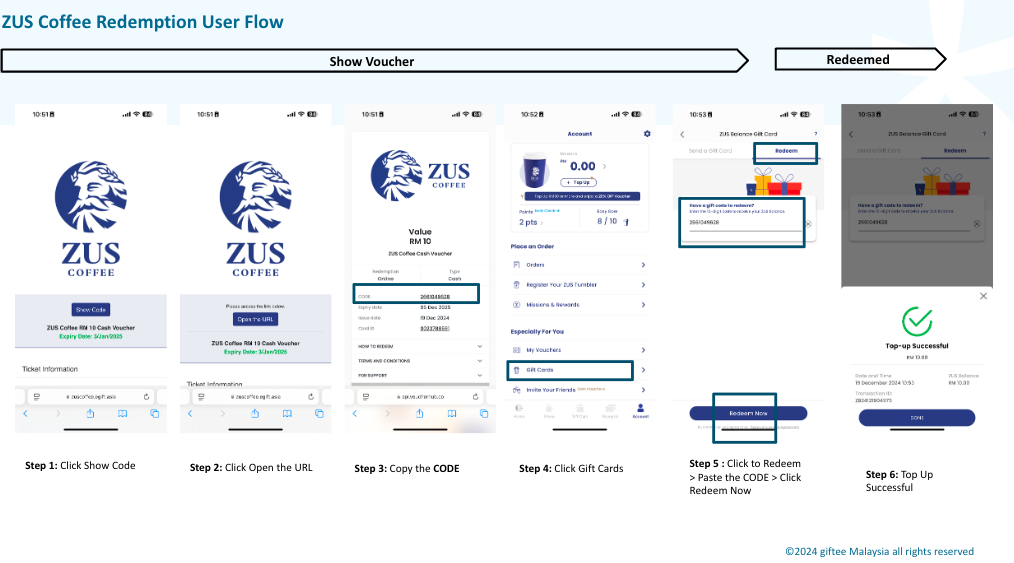
Follow these steps to redeem:
Click Show Code.
Click Open the URL.
Copy the voucher code displayed.
Log in to the ZUS Coffee app and go to Account.
Select Gift Cards.
Tap Redeem, paste the code, and click Redeem Now.
A Top-up Successful notification will appear once redemption is complete.
Was this article helpful?
That’s Great!
Thank you for your feedback
Sorry! We couldn't be helpful
Thank you for your feedback
Feedback sent
We appreciate your effort and will try to fix the article