How to Redeem Your Touch ‘n Go eWallet Direct Credit (TNG) Voucher
Follow these steps to successfully redeem your voucher:
Use your mobile phone to access the voucher (redemption via laptop or desktop is not supported).
Make sure the Touch ‘n Go eWallet app is installed on your device.
Click the voucher URL you received.
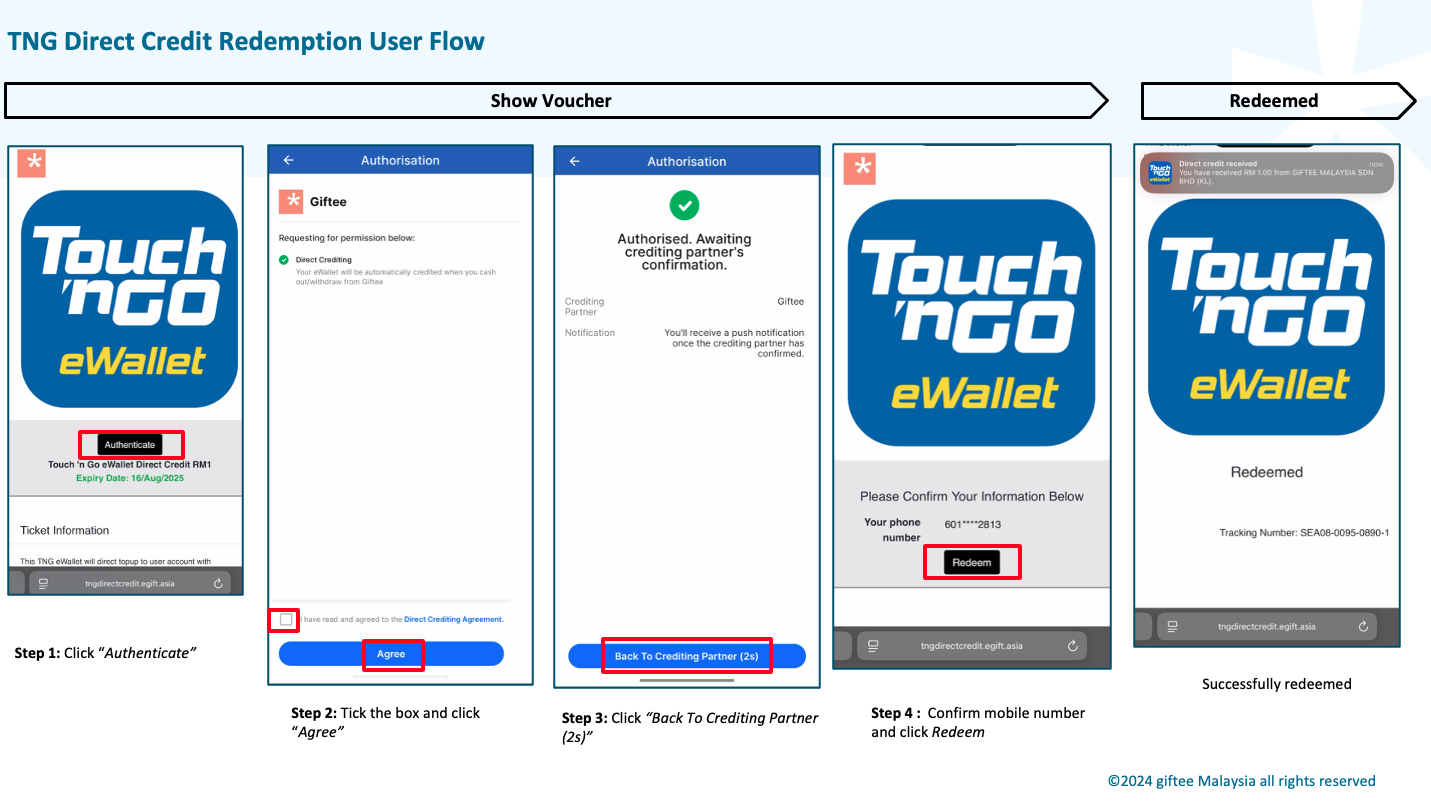
Tap Authenticate – you will be redirected to the TNG eWallet app.
On the Authorisation page, tick the box “I have read and agree to the Direct Crediting Agreement”, then click Agree.
Tap Back to Crediting Partner.
Verify the last 4 digits of your mobile number and click Redeem if correct.
Your voucher status will change to Redeemed.
For a visual guide, you can also refer to the video and images provided for easier understanding.
Was this article helpful?
That’s Great!
Thank you for your feedback
Sorry! We couldn't be helpful
Thank you for your feedback
Feedback sent
We appreciate your effort and will try to fix the article